
Part Purchase Texts
 Reference Contents > Standard Texts > Part Purchase Texts
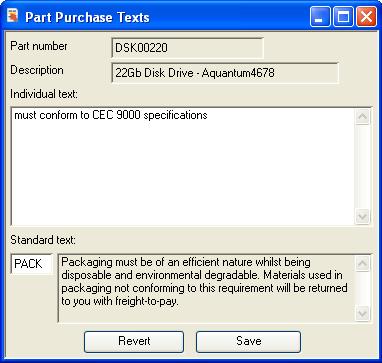
This window opens from an order processing or maintenance activity to allow you to view the individual and standard text for a part. With the window open, clicking on the Parts ScratchPad will change the part viewed. If you have Master — Parts — Update menu access privileges you will be able to change the text and standard text code.
|
Field |
Description |
|---|---|
|
Part Number |
Parts Master. Part number unique identifier. {PTMFILE.PTMPTNO char 18} |
|
Description |
Parts Master. Part description. {PTMFILE.PTMDESC char 30} |
|
Individual Purchase Text |
Parts Master. Special purchase text. {PTMFILE.PTMPUTX char 10000000} |
|
Standard Purchase Text Code |
Parts Master. Purchasing std. text code. {PTMFILE.PTMTXP char 4} |
|
Standard Text |
Standard Texts (E,P,S,W). Text. {TXTFILE.TXTTEXT char 10000000} |
|
Button |
Action |
|---|---|
|
Revert |
To revert any changes to the previously saved version. |
|
Save |
To save the changes you have made to the data file. |
| See also: – |
Compiled in Program Version 5.10. Help data last modified 8 May 2012 06:21:00.00. Class wTxpEdit last modified 7 Sep 2017 08:57:27.
Reference Contents > Standard Texts > Part Purchase Texts