
MRP Fuzzy Pegging Analysis
 Reference Contents > MRP Planning, Processing and Results > MRP Fuzzy Pegging Analysis
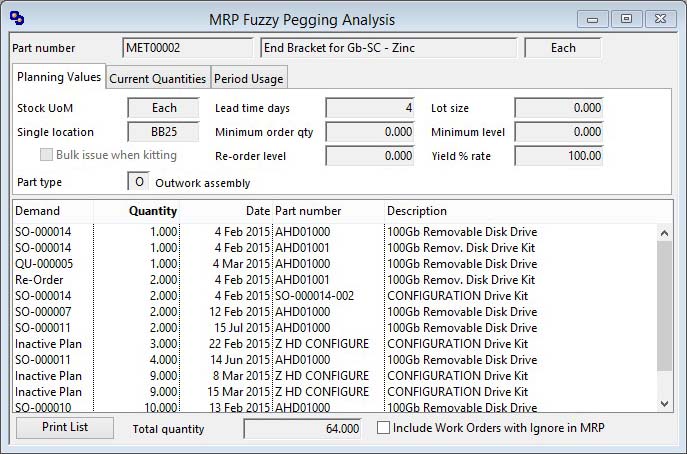
After selecting a part in the MRP Results Listing window, clicking on the Fuzzy Pegging button will open this window.
Fuzzy Pegging is a sort of MRP demand pegging. In conventional pegging the system records the source of all dependant demand for a part through multiple levels. This is an enormously intensive process to add to the MRP processing and would consume considerable database space. As an alternative, Fuzzy Pegging is a presumptive analysis of the demand items that are currently on the system that could be contributing to the demand on the part.
The system carries out a multi-level where used analysis on the selected part and identifies any demand for parent items in the where-used list.
The list interactively operates with the Parts ScratchPad and the Bill of Materials and Where-Used Listings window that can be opened from the Parts ScratchPad Options Menu menu. This window will interactively operate with the Results Listing window. I.E. If you click on a BoM listed part the system will attempt to list the MRP results for that part.
|
Field |
Description |
|---|---|
|
Part number |
Parts Master. Part number unique identifier. {PTMFILE.PTMPTNO char 18} |
|
Description |
Parts Master. Part description. {PTMFILE.PTMDESC char 30} |
|
Stock UoM |
Parts Master. Standard stock unit of measure. {PTMFILE.PTMSTUM char 6} |
|
Demand List |
The list provides potential demand that has loaded the part. Double-click to drill down to view and order. |
|
Total quantity |
The total demand quantity. |
|
Include Work Orders with Ignore in MRP |
With this flag set, WOs that have had the Ignore in MRP option set are included as sources of dependant demand. |
|
Button |
Action |
|---|---|
|
Print List |
To print a report of the listed items. |
The window has 3 tab panes.
Planning Values
Current Quantities
Period Usage
Planning Values
Planning details for the assembly.
|
Field |
Description |
|---|---|
|
Stock UoM |
Parts Master. Standard stock unit of measure. {PTMFILE.PTMSTUM char 6} |
|
Lead time |
Parts Master. Lead time in active (buy or make) days. {PTMFILE.PTMLEAD number 0dpShortnum} |
|
Lot size |
Parts Master. Re-order quantity. {PTMFILE.PTMREQT number 3dp} |
|
Single or Preferred Location |
Parts Master. Stores single or preferred location. {PTMFILE.PTMSLOC char 8} |
|
Minimum Order Quantity |
Parts Master. Re-order quantity. {PTMFILE.PTMREQT number 3dp} |
|
Minimum Stock |
Parts Master. Minimum stock level. {PTMFILE.PTMMINS number 3dp} |
|
Bulk issue when kitting |
Parts Master. Bulk issue flag. {PTMFILE.PTMBULK boolean} |
|
Re-order Level |
Parts Master. Re-Order level. {PTMFILE.PTMROLE number 3dp} |
|
Yield |
Parts Master. Yield percent (default 100.00). If system preference MCDYIEU set Yield unit loss (default 0.00). {PTMFILE.PTMYIEL number 2dpShortnum} |
|
Part Type |
Parts Master. Part type (A,B,M,N,O,P). {PTMFILE.PTMTYPE char 1} |
Current Quantities
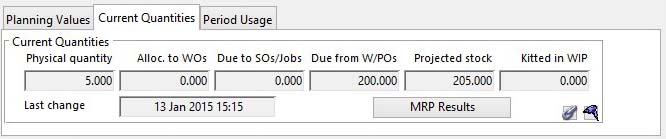
Current quantities for the assembly. For details see the Parts Current Quantity subwindow.
Period Usage
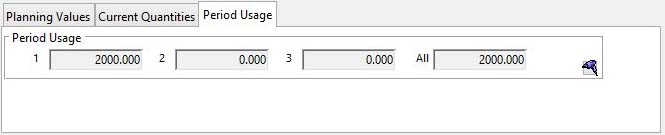
Period usage for the part. For details see the Parts Usage subwindow.
| See also: – |
Compiled in Program Version 5.10. Help data last modified 8 May 2012 06:20:00.00. Class wMrpPegging last modified 23 Sep 2017 10:50:58.
Reference Contents > MRP Planning, Processing and Results > MRP Fuzzy Pegging Analysis