
Calculator
 Reference Contents > General Program Functions > Calculator
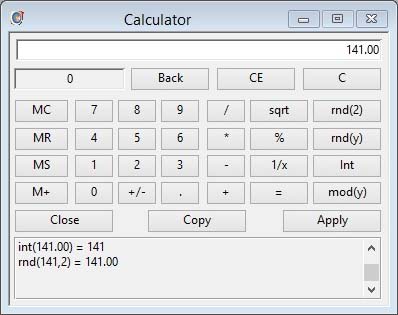
The Calculator is a pop-up interactive tool available from a context menu when you point the mouse over any numeric window field. It is also available from the ScratchPad menu.
|
Field |
Description |
|---|---|
|
Entry and Result |
The number being entered or the running result. |
|
Memory |
The value stored in memory. |
|
Calculation Log |
A log of the completed calculations during this working session. |
|
Button |
Action |
|---|---|
|
Back |
Backspace or delete from right. |
|
CE |
Cancel entry only. |
|
C |
Clear all. |
|
MC |
Clear memory. |
|
MR |
Memory recall. |
|
MS |
Save current number in memory. |
|
M+ |
Add current number to memory. |
|
Number keypad |
Number value entry. |
|
+/- |
Change sign of current number. |
|
. |
Decimal point entry. |
|
/ * – + |
Divide by, multiply by, subtract or add the next number. |
|
sqrt |
Square root of current number. |
|
% |
Percent from calculation. |
|
1/x |
Reciprocal of current number. |
|
= |
Show and log result of calculation. |
|
rnd(2) |
Round current number to 2 decimals. |
|
rnd(y) |
Round current number to entered number of decimals. |
|
Int |
Integer of current number. |
|
mod(y) |
Modulus of current number by next number. |
|
Close |
Close calculator without passing result. |
|
Copy |
Copy the current result to the Clipboard. |
|
Apply |
Apply result and close Calculator. This button is only available when the calculator has been opened from a context menu over an enterable numeric window field. |
| See also: – |
Compiled in Program Version 5.10. Help data last modified 26 May 2004 15:11:00.00. Class wCalculator last modified 18 Feb 2015 01:54:36.
Reference Contents > General Program Functions > Calculator