
Sales Order and Quotation List
 Reference Contents > Sales Order > Sales Order and Quotation List
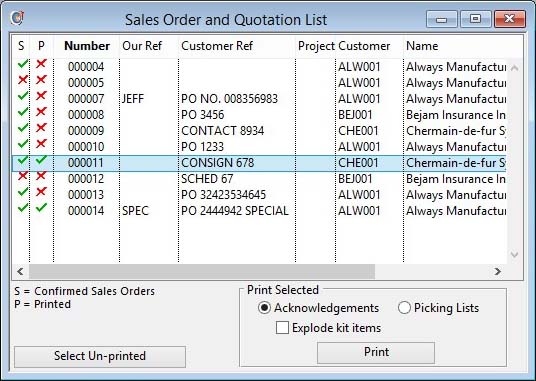
This window lists a selection of Sales Orders and Quotations. It opens from the Select Sales Order window after choosing from the selection options dropdown list. You can use the list to print a number of documents at the same time.
|
Field |
Description |
|---|---|
|
Sales Order List |
Lists all Sales Orders and Quotations. Click to select, double-click to confirm.
|
|
Acknowledgements |
Select for Sales Order Acknowledgement or Quotation printing. |
|
Explode kit items |
Check to show kit items exploded in the SO or Quote document. |
|
Picking Lists |
Select for Picking List printing. |
 TIP: If you have privileges to delete orders, right-click on the list to Delete Selected Documents. This function can save a great deal of time when cleaning the system of unwanted documents.
|
Button |
Action |
|---|---|
|
Select Un-printed |
All un-printed Quotations and Sales Orders will be selected in the list. |
|
|
Prints each of the Sales Orders and Quotations selected in the list. Right-click to change the report destination.
|
| See also: – |
Compiled in Program Version 5.10. Help data last modified 17 May 2012 09:45:00.00. Class wSalesOList last modified 23 Sep 2017 10:51:06.
Reference Contents > Sales Order > Sales Order and Quotation List