
OVERVIEW
This window opens when you operate the Process — Shopfloor — Review History for Part menu function. It enables you to view the costed operational batch history for all work orders for an assembly.
File Path
Process > Shopfloor > Review History for Part
This file path takes you to the Work History Listing window
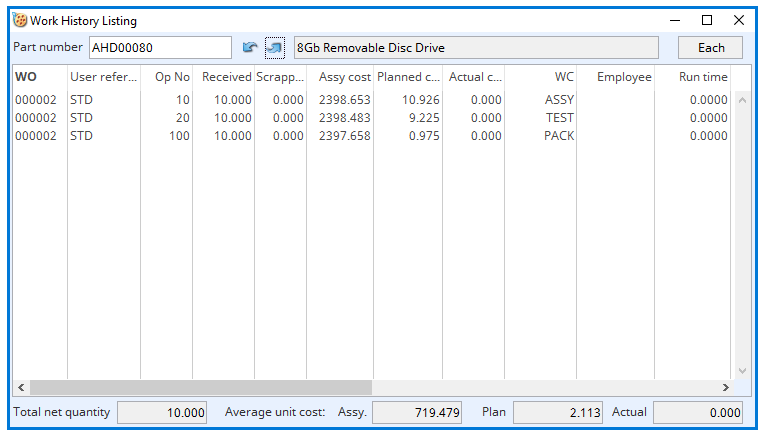
Part Number
Part number unique identifier. {PTMFILE.PTMPTNO char 18}
Up and Down Arrows
Use these arrows to move through the part numbers.
Description
Part description. {PTMFILE.PTMDESC char 40}
Stock UoM
Standard stock unit of measure. {PTMFILE.PTMSTUM char 6}
History List
Lists the work history records for the assembly, one line per posted operation batch.
The list carries the following columns:
| Column Header | Description |
| WO | The Work Order number the operation was posted against. |
| User Reference | The Work Order user reference. |
| Op No | The operation number within the process route. |
| Received | The quantity of the assembly received by this posting. |
| Scrapped | The quantity scrapped by this posting. |
| Assy Cost | The assembly cost for the posting. |
| Planned Cost | The planned work centre cost, based on the process route times. |
| Actual Cost | The actual work centre cost, based on the times actually recorded. |
| WC | The work centre code the operation was performed at. |
| Employee | The employee code recorded against the operation. |
| Run Time | The run time recorded for the operation. |
| Setup Time | The setup time recorded for the operation. |
| Total Time | The total of recorded runtime and setup time. |
| Trans ID | The Work Order history sequence number of the posting. The same identifier is shown in the Log Work Order Operational Performance and Work Tracking Analysis windows, and is used when deleting a posted operation. |
| Scrap Code | The scrap reason code recorded against the scrapped quantity. Scrap reason codes are defined in File — System Manager — Index Codes. |
| Scrap Reason | The description of the scrap reason code. |
| Work Centre | The description of the work centre the operation was performed at. |
TIP: Double-click a line to open the Log Work Order Operational Performance window with that line pre-selected, so the posting can be examined or amended without re-selecting it.
Total Net Quantity
The net received quantity of the assembly listed.
Average Unit Assembly Cost
The average unit assembly cost.
Average Planned Work Centre Cost
The average unit planned work centre cost based on route times.
Average Actual Work Centre Cost
The average unit actual work centre cost based on actual times.
Compiled in Program Version 6.00. Help data last modified 23 June 2022.
Class wWohList last modified 25 May 2022.