
Work Order Details
 Reference Contents > Work Orders > Work Order Details
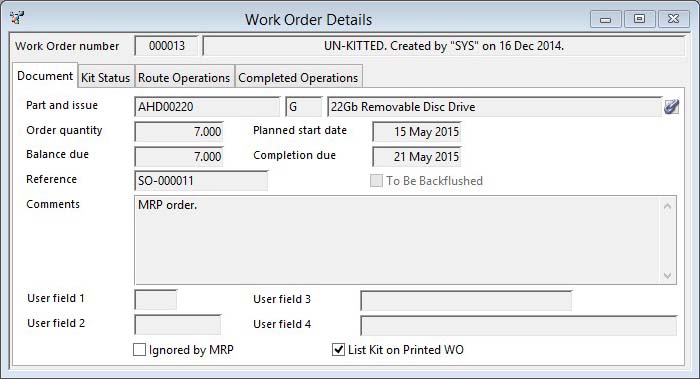
This window is a general purpose review window for Work Orders. It is opened if you drill down on a reference to a work order and if you click on the Show button on the Select Work Order window. This is simply a review window and no changes can be made. However, right-clicking on the Work Order Number will provide access to the Works menu for maintenance functions.
|
Field |
Description |
|---|---|
|
Work Order Number |
Work Orders. Work order number. {WKOFILE.WKOWONO char 6} |
|
Notes |
Who created the WO and when. |
The window has 4 tab panes.
Document
Kit Status
Route Operations
Completed Operations
Document
Details of the work order.
|
Field |
Description |
|---|---|
|
Assembly Part Number |
Work Orders. Part number (parent assembly). {WKOFILE.WKOPTNO char 18} |
|
Part Issue Reference |
Work Orders. Assembly part issue reference (when WO created). {WKOFILE.WKOISSU char 4} |
|
Part Description |
Parts Master. Part description. {PTMFILE.PTMDESC char 30} |
|
Order Quantity |
Work Orders. Quantity ordered. {WKOFILE.WKOOQTY number 3dp} |
|
Latest Kitting Date |
Work Orders. Latest kitting and start date. {WKOFILE.WKOLATE date date1980} |
|
Balance Due |
Work Orders. Balance due still for completion. {WKOFILE.WKOBAL number 3dp} |
|
Planned Completion Date |
Work Orders. Date of planned completion. {WKOFILE.WKOCDAT date date1980} |
|
Reference |
Work Orders. User reference for WO. {WKOFILE.WKOUSER char 15} |
|
To Be Backflushed |
Work Orders. To be backflushed flag. {WKOFILE.WKOBACK boolean} |
|
Comments |
Work Orders. Comments printed on header of WO. {WKOFILE.WKOCOMM char 2000} |
|
User 1 |
Work Orders. User character field 1 (single character). {WKOFILE.WKOUSE1 char 1} For more details, see the Work Order Maintenance window topic. |
|
User 2 |
Work Orders. User character field 2 (4 characters). {WKOFILE.WKOUSE2 char 4} |
|
User 3 |
Work Orders. User character field 3 (18 characters). {WKOFILE.WKOUSE3 char 18} |
|
User 4 |
Work Orders. User character field 4 (30 characters). {WKOFILE.WKOUSE4 char 30} |
|
Ignored by MRP |
Work Orders. Ignored by MRP flag. {WKOFILE.WKOMRP boolean} |
|
List Kit on Printed WO |
Work Orders. Provide component list on printed WO flag. {WKOFILE.WKOKITL boolean} |
Kit Status
|
Field |
Description |
|---|---|
|
Kit Status List |
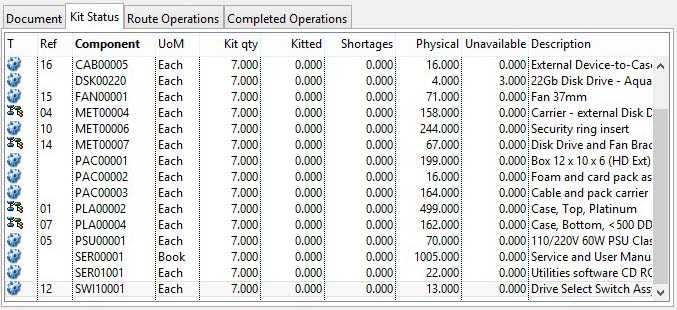
List of kit list for the Work Order showing status. Double-click to put parts in ScratchPad. |
Route Operations
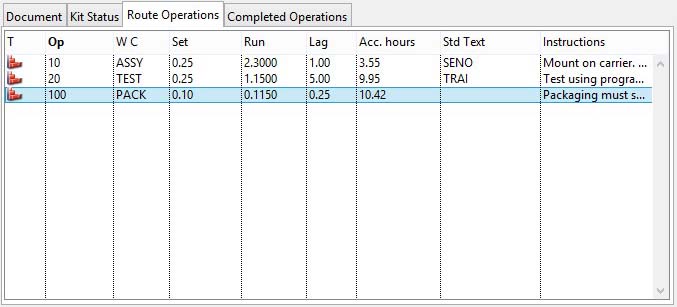
This pane shows a list of work centre operations that the WO will undergo.
|
Field |
Description |
|---|---|
|
Operation List |
List of operations for the Work Order regardless of any current work completion. |
Completed Operations
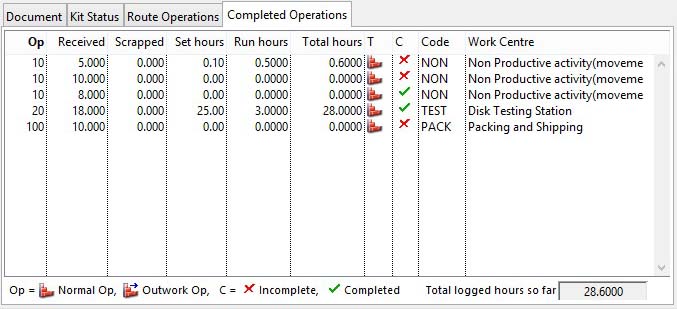
This pane shows a list of work centre operations that have been recorded as completed.
|
Field |
Description |
|---|---|
|
Work History List |
A list of the operation batches logged so far. The times can be edited in the Log Performance function. |
|
Total Logged Hours |
The total time so far logged to the WO. |
| See also: – |
Compiled in Program Version 5.10. Help data last modified 17 May 2012 10:26:00.00. Class wWoShow last modified 23 Sep 2017 10:51:14.
Reference Contents > Work Orders > Work Order Details