
Customer Parts Reports
 Reference Contents > Customer Parts > Customer Parts Reports
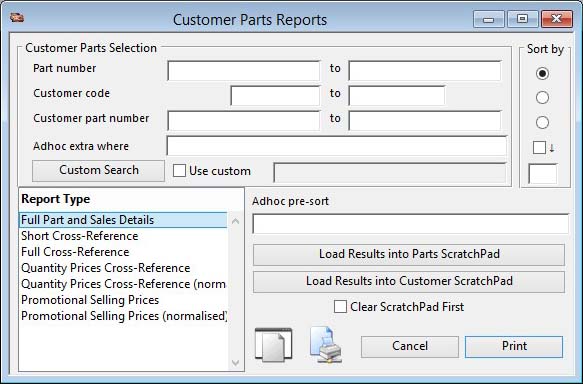
This window prints reports from the customer-parts records. Enter a range restriction if required, select a sort, select the report type you want and confirm with a Print Report.
 NOTE: This window contains fields introduced with version 5 that enable additional search (and sometimes sort controls), such as Adhoc extra where. For more help on their use and examples see the Client-Server SQL Introduction help.
You can drag and drop onto the Print Report button from the Customers or Parts Scratchpad to obtain a report of selected customers or parts only.
|
Field |
Description |
|---|---|
|
Customer Part Selection |
Enter a selection in the Customer Part Selection subwindow. |
|
Report Type |
Select a report type. Any custom reports entered in the Settings will appear at the bottom of the list. |
|
Button |
Action |
|---|---|
|
Load Results into Parts ScratchPad |
Instead of producing a report, the selection is used to populate the ScratchPad with all parts encountered. |
|
Load Results into Customer ScratchPad |
Instead of producing a report, the selection is used to populate the ScratchPad with all customers encountered. |
|
Cancel |
Aborts the process currently in session. The keyboard equivalent is the Esc key for Windows computers and Command-.(full stop or period) for the Mac. |
|
|
Will cause a report to be printed of the subject matter. Right-click to change the report destination. |
| See also: – |
Compiled in Program Version 5.10. Help data last modified 3 Jan 2015 10:28:00.00. Class wCptPrint last modified 17 Oct 2017 04:29:54.
Reference Contents > Customer Parts > Customer Parts Reports