
Inventory History Selection
 Reference Contents > Stock History > Inventory History Selection
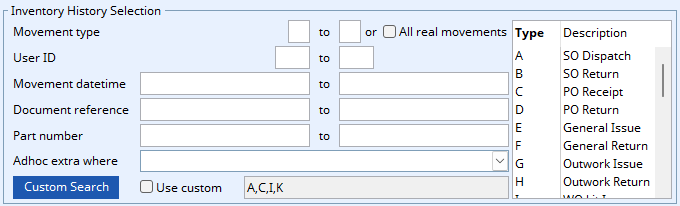
This subwindow is used to define the range criteria for a selection of inventory history. It is displayed on windows requiring their selection.
Parent Windows
Inventory History Report Selection
Graphical Analysis Maintenance – Graphs Tab
Operation
Enter data in the data entry boxes to restrict the range of records. Records must meet all criteria entered to be selected. If the left and/or right data entry boxes are left blank for a particular criteria, records will be selected between the first and/or last otherwise qualifying record. Data entry boxes can be populated by finding a single item using Keyword Search, drag and drop from the Parts ScratchPad, or by double-clicking a list item from the Keyword Result window.
Data records can be obtained using one of the following methods or a combination of them (see Tip below):
- Enter values into the selection ranges and use the Standard Search. The context menu provides a Clear Selection function.
- Define or use a Custom Search.
- Create an Ad Hoc Search Calculation using the context menu function.
- Drag-and-drop one or more lines from the Parts ScratchPad (or BoM and Where-Used Listing) onto the general window area.
- Use the ScratchPad Transfer Selected function
- Use the KeyWord Search Transfer Selected function
 TIP: Using an Ad Hoc Search Calculation (3) overrides any Custom Search (2) and a Custom Search overrides the Standard Search (1). In any of the search cases (1, 2 or 3), ScratchPad Transfer and Drag-and-Drop or KeyWord Search Transfer (4, 5 or 6) is combinational, so that records found using any of these methods must also conform to the search criteria adopted.
 NOTE: This window contains fields introduced with version 5 that enable additional search (and sometimes sort controls), such as Adhoc extra where. For more help on their use and examples see the Client-Server SQL Introduction help.
|
Field |
Description |
|---|---|
|
From and To |
Enter data that restricts the records selected. If left blank, data will be selected from the maximum and minimum extremes in the file. All selections criteria you enter will have to be met by each record processed.
|
|
All real movements |
Selects all real physical stock movements only, ignoring such entries as order preparation history or allocations. |
|
Use custom |
To turn on and off the use of the custom search design. A custom search will override the standard search. |
|
Custom search name |
The name of the currently selected custom search. To use it click on the checkbox. To change it click on the Custom Search button. |
User ID from/to
Added in V6.0008.
Restricts the selection to inventory history recorded by a range of users. Enter the same User ID in both boxes to report on a single user. Leave both empty for all users.
 TIP: This is the quickest way to review what one member of staff has been doing in inventory over a period of time. Combine a User ID range with a movement date range for more specific results.
|
Button |
Action |
|---|---|
|
Custom Search |
Opens the Custom Search Selection window and checks the Use custom checkbox. |
| See also: – |
Compiled in Program Version 6.0019. Help data last modified 13 Aug 2026 09:49:56.00. Class wSthSelect last modified 03 Jun 2026 11:48:53.
Reference Contents > Stock History > Inventory History Selection